Verification Initial Counts Tab
Utilities > Verification > Initial Counts
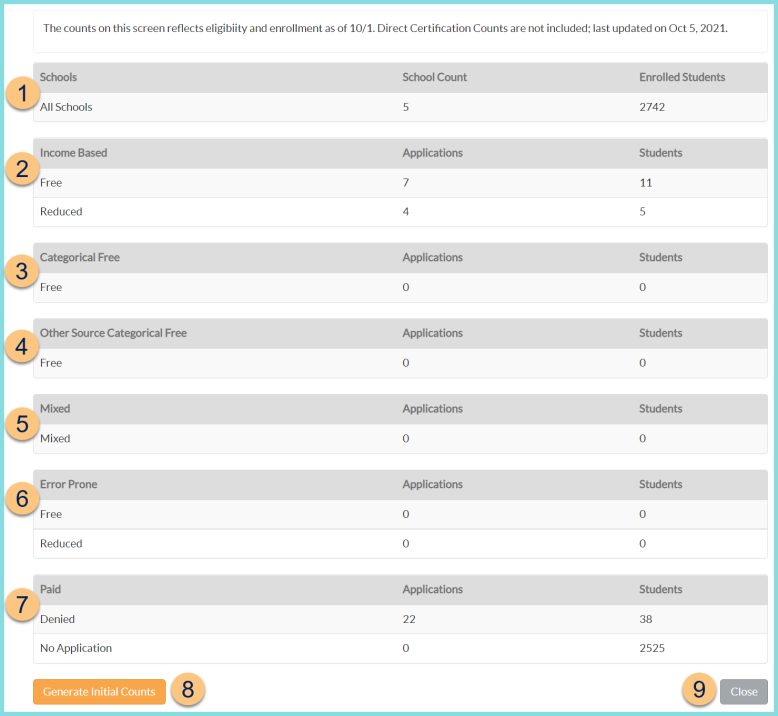
The counts on this screen reflects eligibility and enrollment as of 10/1. Direct Certification Counts are not included; last updated on Mon DD, YYYY.
Note: Counts (1-7) do not appear until the Generate Initial Counts button has been clicked (details below).
-
Schools - notice the count of Schools and Enrolled Students as of October 1. Note: Buildings excluded from verification are not included.
-
Income Based - notice the count of meal applications (Eligibility Status: Free, Reduced; Eligibility Reason: Income Calculated) and count of students with eligibility based on those applications as of October 1.
-
Categorical Free - notice the count of meal applications (Eligibility Status: Free; Eligibility Reason: Categorically Eligible) and count of students with eligibility based on those applications as of October 1.
-
Other Source Categorical Free - notice the count of meal applications (Eligibility Status: Free; Eligibility Reason: Other Source Categorically Eligible) and count of students with eligibility based on those applications as of October 1.
-
Mixed - notice the count of meal applications (Eligibility Status: Mixed; Eligibility Reason: Mixed) and count of students with eligibility based on those applications as of October 1.
-
Error Prone - notice the count of meal applications within the error-prone threshold (Eligibility Status: Free, Reduced; Eligibility Reason: Income Calculated) and count of students with eligibility based on those applications as of October 1.
-
Paid - notice the count of meal applications (Eligibility Status: Paid) and count of students with eligibility based on those applications as of October 1.
-
Generate Initial Counts - click for TITAN to calculate the values of items 1-7 based on Verification Type as of October 1.
-
Close - click to return to the Verification screen